Prerequisition
- Java Development Kit (JDK) installed via sdkman -> https://sdkman.io
- check the installation via
javac --versionfor compiler andjava --versionfor runtime
Build from scratch
- create project directory and navigate to it
- create file
Main.javawith content:1 2 3 4 5public class Main { public static void main(String[] args) { System.out.println("Hello World"); } } - compile the file via
javac Main.java - run the file via
java Main
Passing arguments
- modify the file
Main.javawith content:1 2 3 4 5 6public class Main { public static void main(String[] args) { System.out.println("Hello World"); System.out.println(args[0]); } } - recompile the file via
javac Main.java - run the file via
java Main test - check the output
- try to run the file via
java Mainwithout any arguments then you will get error1 2 3Hello from java! Exception in thread "main" java.lang.ArrayIndexOutOfBoundsException: Index 0 out of bounds for length 0 at Main.main(Main.java:4)
Manage class directory
- in the project directory, create directory for class package
mkdir -p com/example/java - move the file
Main.javato the directorycom/example/java. You may delete the class file in the root, it’s optional. - compile the file via
javac com/example/java/Main.java - run the file via
java com.example.java.Main - you should get error
1 2Error: Could not find or load main class com.example.java.Main Caused by: java.lang.NoClassDefFoundError: com/example/java/Main (wrong name: Main) - The error is because the package name is not matching the directory structure. Modify the file
Main.javawith content:1 2 3 4 5 6 7package com.example.java; public class Main { public static void main(String[] args) { System.out.println("Hello World"); } } - recompile and rerun again via
java com.example.java.Main sampleArgs
Java Modifiers
Java modifiers are keywords that define the properties and access levels of classes, methods, and variables. There are two types of modifiers:
Access Modifiers
Access modifiers control the visibility and accessibility of classes, methods, and variables.
| Modifier | Same Class | Same Package | Subclass | Different Package |
|---|---|---|---|---|
public |
✓ | ✓ | ✓ | ✓ |
protected |
✓ | ✓ | ✓ | ✗ |
default (no modifier) |
✓ | ✓ | ✗ | ✗ |
private |
✓ | ✗ | ✗ | ✗ |
Examples:
|
|
Non-Access Modifiers
Non-access modifiers provide additional information about classes, methods, and variables.
Common Non-Access Modifiers:
- static - Belongs to the class rather than instances
- final - Cannot be modified/overridden
- abstract - Abstract class or method (must be implemented)
- synchronized - Thread-safe access
- volatile - Variable may be modified by different threads
- transient - Not serialized when persisting object
Examples:
|
|
Using IDE
Using IntelliJ
- Open Intellij
- click
File->New->Projectfrom top menu bar - on the “New Project” window, select “Java”, fill the project name and location, choose Build tool (IntelliJ or Maven or Gradle), select JDK version, then click
Create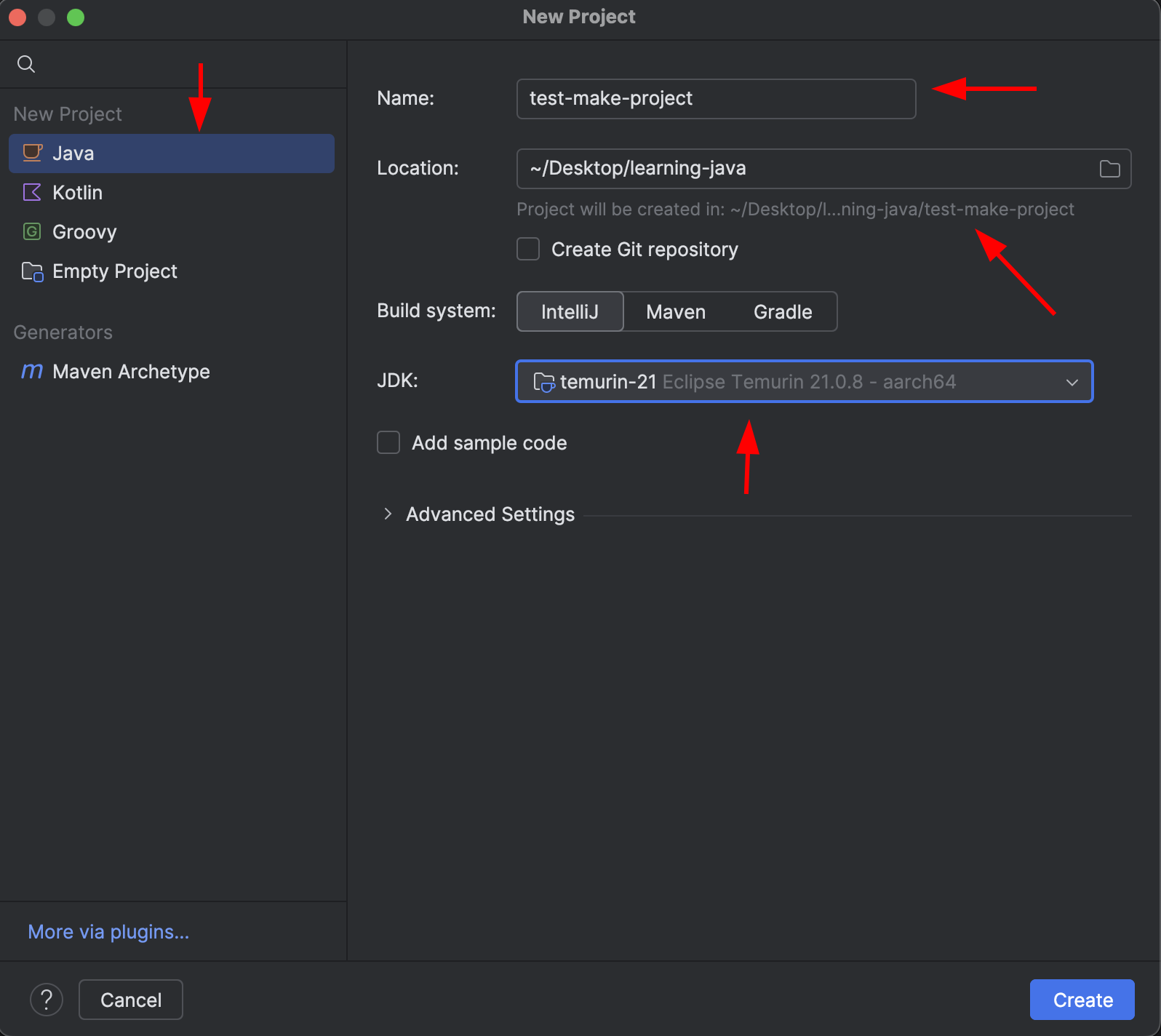
- create new class in
srcdirectory by selectingsrcdirectory then right click ->New->Java Class - fill the class name
com.example.java.Main - inside the Main.java file, create main method by typing
psvmand pressTab. You should getpublic static void main(String[] args) { } - inside the method, type
soutand pressTab. You should getSystem.out.println(); - inside the brackets, type
"Hello World" - run the file by clicking play button on the top bar or press
Shift + F10
Using VSCode
- install necessary plugins
- click
cmd/ctrl + shift + pto open command palette - type
java: create java projectand pressEnter - Select project type (we choose ‘No Build Tool’ for now)
- No Build Tool, work with source code directly without any build tools
- Maven, provided by Maven for Java
- Gradle, provided by Gradle for Java
- Spring Boot, provided by Spring Initializr Java Support
- Quarkus, provided by Quarkus
- MicroProfile, provided by MicroProfile Starter
- JavaFX, provided by Maven for Java
- Micronout, Provided by Launch for Micronout Framework
- Graal Development Kit for Micronout
- Select project location
- Input a Java project name, e.g.
todo-project - click right click on the src directory then select
New Java File->Class - Input the class name. e.g.
Mainor you can prefix it with package name, e.g.com.example.java.Main - inside the Main.java file, create main method by typing
psvmand pressTab. You should getpublic static void main(String[] args) { } - inside the method, type
soutand pressTab. You should getSystem.out.println(); - inside the brackets, type
"Hello World" - run the file by clicking play button on the top bar or press
F5
Setting Up Code Formatter
- click
cmd/ctrl + shift + pto open command palette - type
preferences: open workspace settings (JSON)and pressEnter - add the following line to the JSON file
1 2 3{ "editor.formatOnSave": true, } - click
OKto apply the formatter
Variables
- Java is a statically typed language
- All variable must have their types declared
- Java naming conventions require that variable name always start with lowercase or camel case.
- example:
int myVariable = 10; - example:
String myString = "Hello World";
- example:
Primitive Data Types
These are not objects — they store values directly in memory (for speed and simplicity).
| Type | Size | Example | Description |
|---|---|---|---|
byte |
8-bit | byte b = 10; |
small integers (-128 to 127) |
short |
16-bit | short s = 200; |
small integers (-32,768 to 32,767) |
int |
32-bit | int x = 1000; |
standard integer |
long |
64-bit | long l = 100000L; |
large integer |
float |
32-bit | float f = 3.14f; |
decimal number (low precision) |
double |
64-bit | double d = 3.14159; |
decimal number (high precision) |
char |
16-bit | char c = 'A'; |
single Unicode character |
boolean |
1-bit (logical) | boolean b = true; |
true/false |
Helper Classes (Wrapper Classes)
Java provides object-based counterparts for each primitive type — these are classes in java.lang package that wrap primitive values in objects.
| Primitive | Wrapper Class | Example |
|---|---|---|
byte |
Byte |
Byte b = 10; |
short |
Short |
Short s = 200; |
int |
Integer |
Integer x = 1000; |
long |
Long |
Long l = 100000L; |
float |
Float |
Float f = 3.14f; |
double |
Double |
Double d = 3.14159; |
char |
Character |
Character c = 'A'; |
boolean |
Boolean |
Boolean b = true; |
Stack vs Heap
Primitive data types are stored in the stack memory, while wrapper classes are stored in the heap memory.
| Aspect | Primitive | Wrapper Class |
|---|---|---|
| Type | basic | object |
| Stored in | stack | heap |
Can be null |
❌ | ✅ |
| Default value | 0 / false | null |
| Used in Collections | ❌ | ✅ |
| Example | int, double |
Integer, Double |
Stack Memory
What it stores
- Primitive values (int, boolean, etc.)
- References to objects (not the object itself)
- Local variables (inside methods)
- Method call frames (function call hierarchy)
Characteristic
- Fast access (because it’s small and directly managed)
- Last In, First Out (LIFO) structure
- Automatically cleaned when a method finishes
- Limited size → can cause StackOverflowError
Example
|
|
When demo() ends →
- variable x is removed from stack
- reference y is removed too
- but object 20 in heap remains until garbage collected
Heap Memory
What it stores:
- All objects
- Arrays
- Instance variables (inside objects)
- Wrapper classes (Integer, Double, etc.)
🔹 Characteristics:
- Slower access (larger and dynamically managed)
- Shared by all threads
- Cleaned by the Garbage Collector (GC)
- Can cause OutOfMemoryError if you create too many objects
Summary
| Aspect | Stack | Heap |
|---|---|---|
| Speed | Very fast | Slower |
| Lifetime | Tied to method execution | Exists until GC removes it |
| Scope | Local (per thread) | Global (shared) |
| Error | StackOverflowError |
OutOfMemoryError |
| Null allowed? | No (for primitives) | Yes (objects can be null) |
| Who cleans it? | JVM automatically after method ends | Garbage Collector |
Collections
The Java Collections Framework is a set of interfaces, classes, and algorithms for storing and manipulating groups of objects.
The core collection interface encapsulate different types of collection, which are shown in the figure below (https://docs.oracle.com/javase/tutorial/collections/interfaces/index.html)
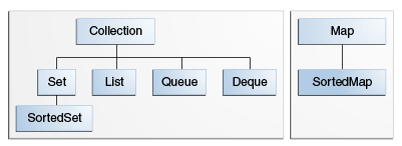
- Collection – the root of the collecion hierrachy. A collection represents a group of objects known as its elements.
- Set – a collection that does not contain duplicate elements.
- List – an ordered collection (also known as a sequence). Lists may contain duplicate elements.
- Queue – a FIFO collection designed for holding elements prior to processing.
- Deque – a double-ended queue that allows elements to be added or removed from both ends, used for implementing both FIFO and LIFO collections.
- Map – an object that maps keys to values. A map cannot contain duplicate keys; each key can map to at most one value.
List
There are serveral ways to create a List:
Using new with Constructor
|
|
- where
ArrayListandLinkedListare classes that implement theListinterface. - the
Integeris type parameter that specifies the type of elements that the list can store.
Example
|
|
Using Arrays.asList
```java
List<Integer> list = Arrays.asList(1, 2, 3);
```
- Available since Java 1.2, so it’s supported in all Java versions.
- Creates a mutable list (to some extent). The list returned by Arrays.asList is a view of the underlying array, meaning you can modify the elements of the list (e.g., using set()), but you cannot add or remove elements (doing so throws an UnsupportedOperationException).
- Allows null elements in the list because it wraps an array, and arrays in Java can contain null.
- Returns a list backed by the original array. It’s a lightweight wrapper (
ArrayListfromjava.util.Arrays, notjava.util.ArrayList), so changes to the list reflect in the underlying array and vice versa (if the array is modified directly). - Useful when you need a quick, lightweight way to convert an array to a list and might want to modify the elements (but not the structure).
- Less memory-efficient for immutable use cases because it’s backed by an array that could be modified elsewhere.
- Example use case: Temporary list for iteration or minor updates to elements.
1 2 3List<String> fixMembers = Arrays.asList(null, "Bob", "Charlie"); fixMembers.set(0, "David"); // Works: changes null to "David" fixMembers.add("Eve"); // Throws UnsupportedOperationException - where
Arrays.asListis a method that returns a fixed-size list backed by the specified array. - the
Integeris type parameter that specifies the type of elements that the list can store.
Using List.of
- Introduced in Java 9, so it’s only available in Java 9 and later.
- Creates an immutable list. The list returned by List.of (introduced in Java 9) cannot be modified in any way—no adding, removing, or updating elements. Any attempt to modify it throws an
UnsupportedOperationException. - Does not allow
nullelements. PassingnulltoList.ofwill throw aNullPointerExceptionat creation time. - Returns a completely independent, immutable list. It does not rely on the original data and is optimized for immutability. The implementation is typically a compact, internal class (e.g.,
ImmutableCollections.ListNin Java). - There’s no way to modify the list or have it reflect changes elsewhere.
- Preferred for creating immutable lists, especially when you want to ensure the list cannot be modified (safer for concurrent or functional programming).
- More memory-efficient for immutable lists because it uses a compact internal representation.
- Example use case: Defining constant lists or returning immutable collections from methods.
List.of or Arrays.asList ?
- Use
Arrays.asListwhen you need a quick list from an array and might want to modify elements (but not the list’s size). - Use
List.ofwhen you want a truly immutable list, especially in modern Java (9+), or when immutability is critical for safety or clarity. If you need a mutable list, you can wrapList.ofin a newArrayList:
|
|
Using Stream API (Java 8+)
The Stream API provides a functional way to create lists, especially useful for transforming or generating data.
-
From Elements or Collections:
- Use Case: When creating lists from streams, especially with transformations or filtering.
- Example:
1 2 3 4 5 6 7 8 9 10 11 12import java.util.ArrayList; import java.util.List; import java.util.stream.Collectors; import java.util.stream.Stream; public class Main { public static void main(String[] args) { List<String> list = Stream.of("Alice", "Bob", "Charlie") .collect(Collectors.toCollection(ArrayList::new)); System.out.println(list); // [Alice, Bob, Charlie] } }
-
Example from a Generated Sequence
- Use Case: When creating lists from a sequence of values, such as a range or a computed series.
- Example:
1 2 3 4 5 6 7 8 9 10 11 12import java.util.List; import java.util.stream.Collectors; import java.util.stream.Stream; public class Main { public static void main(String[] args) { List<Integer> list = Stream.iterate(1, n -> n + 1) .limit(3) .collect(Collectors.toList()); System.out.println(list); // [1, 2, 3] } }
References
for more references see Oracle Java 8 Documentation or choose other versions here Oracle Java SE