Featured image of post TypeScript Fundamentals

TypeScript Fundamentals

TypeScript Fundamentals

Preparation

Please refer to this documentation for installation. Personally, I use volta to install TypeScript. I use bun to install typescript compiler bun add -g typescript. Check your installation using:

1
2
tsc --version # check version
which tsc     # check installation path

Your First TypeScript Program

Create a project folder, e.g., belajar, then create a file app.ts

1
2
let greeting: string = "Hello TS!";
console.log(greeting);

Then run:

1
tsc --outDir dist --watch app.ts

The --outDir flag will create a folder called dist where the compiled JS file is stored, and the --watch flag will watch for any changes in app.ts.

Init Config file

run tsc --init, then it will create a config file tsconfig.json. set the outDir value as follow

1
2
3
4
5
{
    ...
    "outDir": "./dist",
    ...
}

open pallet command cmd/ctr + shift + p and select Tasks: Configure Task -> tsc: build - tsconfig.json

create a launch.json file via ‘RUN AND DEBUG’ vsCode menu then choose Node option. The new file tasks.json will be created. Set the configuration as follow

 1
 2
 3
 4
 5
 6
 7
 8
 9
10
11
12
13
14
15
16
17
18
19
20
21
22
23
{
	"version": "2.0.0",
	"tasks": [
		{
			"type": "typescript",
			"tsconfig": "tsconfig.json",
			"problemMatcher": [
				"$tsc"
			],
			"group": "build",
			"label": "compile typescript",
			"presentation": {
				"echo": false,
				"reveal": "silent",
				"focus": false,
				"panel": "shared",
				"showReuseMessage": false,
				"clear": false
			}
		},
		
	]
}

Create launch.json via debug in VsCode menu
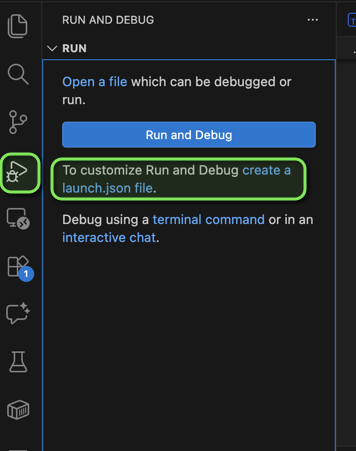
java maven in vscode
create launch.json

and put the following configuration

 1
 2
 3
 4
 5
 6
 7
 8
 9
10
11
12
13
14
15
16
17
18
19
20
{
    "version": "0.2.0", 
    "configurations": [
        
        {
            "type": "node",
            "request": "launch",
            "name": "Launch Program",
            "skipFiles": [
                "<node_internals>/**"
            ],
            "program": "${workspaceFolder}/dist/app.js",
            "outFiles": [
                "${workspaceFolder}/**/*.js"
            ],
            "preLaunchTask": "compile typescript",
            "internalConsoleOptions": "openOnSessionStart"
        }
    ]
}

then you can just press f5 button to compile and run the program. Or simply run with command bun app.ts

Optionally, we can add settings.json to the .vscode folder for formating purpose with this following content

1
2
3
4
5
6
{
  "editor.formatOnSave": true,
  "[javascript,typescript]": {"editor.defaultFormatter": "esbenp.prettier-vscode"},
  "[javascriptreact,typescriptreact]": {"editor.defaultFormatter": "esbenp.prettier-vscode"},
  "[html,css]": {"editor.defaultFormatter": "esbenp.prettier-vscode"},
}

Data Type

Basic Primitive

There are three basic types: string, number, and boolean. can be writen with or without anotation like below

 1
 2
 3
 4
 5
 6
 7
 8
 9
10
11
12
13
14
15
let myNumber: number = 4; // Type annotation for a number variable
let myString: string = "Hello, TypeScript!"; // Type annotation for a string variable
let myBoolean: boolean = true; // Type annotation for a boolean variable

console.log(myNumber); // Output: 4
console.log(myString); // Output: Hello, TypeScript!
console.log(myBoolean); // Output: true

let myName = "Alice"; // TypeScript infers the type as string
let myAge = 30; // TypeScript infers the type as number
let isStudent = false; // TypeScript infers the type as boolean

console.log(myName); // Output: Alice
console.log(myAge); // Output: 30
console.log(isStudent); // Output: false

Interface vs Alias

The differences between Interface and Alias already mentioned in the documentation here.

A good rule:

  • interface → object shapes and contracts
  • type → more complex type compositions

let’s breakdown

  1. Use interfaces when defining objects, class contracts, or APIs.
  2. Use type for unions, primitives, and advanced types
1
2
3
4
5
6
// for enum
type Status = "pending" | "success" | "failed"
// for primitives
type UserID = string
// for tuple
type Coordinates = [number, number]
  1. Use type for complex type composition Type aliases are great for mapped types, intersections, generics, etc. example:
1
2
3
4
type ApiResponse<T> = {
  data: T
  error?: string
}

intersection example:

1
2
3
type Admin = User & {
  role: string
}
  1. Interface supports declaration merging This “declaration merging” feature is mostly useful if you are working with interfaces that are coming from another file or, more commonly, from some library or anything like that, so where you maybe want to extend something you don’t directly control. If you want to add a property to some interface you don’t directly control, you could do that with “declaration merging” like this.
1
2
3
4
5
6
7
interface Config {
  host: string
}

interface Config {
  port: number
}
  1. Interfaces work better with classes. Interfaces are ideal when classes implement them. This is a very OOP-style contract.
1
2
3
4
5
6
7
8
9
interface Logger {
  log(message: string): void
}

class ConsoleLogger implements Logger {
  log(message: string) {
    console.log(message)
  }
}
  1. Performance considerations. The TypeScript team has mentioned that interfaces are slightly better optimized for large object hierarchies. so many teams prefer:
1
interface Props { ... }

instead of

1
type Props = { ... }

Example

Example in a Qwik or React project.

Interface for component props:

1
2
3
4
interface ButtonProps {
  label: string
  disabled?: boolean
}

Type for variants:

1
type ButtonVariant = "primary" | "secondary"

Enum

In TypeScript, there are three common ways to create enum-like data types. The built-in enum, and two modern alternatives using union types and const objects.

Many modern projects actually avoid enum and prefer union types, but it’s important to know all approaches.

ref https://www.typescriptlang.org/docs/handbook/enums.html

Using the built-in enum

example

1
2
3
4
5
enum Status {
  Pending,
  Success,
  Failed
}

Usage:

1
2
3
4
5
const current: Status = Status.Success

if (current === Status.Success) {
  console.log("Success!")
}

String enums example. These are more common because they are readable.

1
2
3
4
5
enum Status {
  Pending = "PENDING",
  Success = "SUCCESS",
  Failed = "FAILED"
}

Usage

1
2
3
function handle(status: Status) {
  console.log(status)
}

Enum with union type

Many teams avoid enums and use union types.

1
type Status = "pending" | "success" | "failed"

Usage

1
2
3
4
5
function handle(status: Status) {
  if (status === "success") {
    console.log("OK")
  }
}

Enum pattern with as const

Another powerful pattern

1
2
3
4
5
const Status = {
  Pending: "PENDING",
  Success: "SUCCESS",
  Failed: "FAILED"
} as const

create type from object

1
type Status = typeof Status[keyof typeof Status]

usage

1
const s: Status = Status.Success

Interfaces

  • contract that define types
  • compiler enforces the contract via type checking
  • collection of property and method definition
  • duck typing
 1
 2
 3
 4
 5
 6
 7
 8
 9
10
11
12
13
14
15
16
interface Duck {
  walk: () => void;
  swim: () => void;
  quack: () => void;
}

let probablyADuck: Duck = {
  walk: () => console.log("Walking like a duck"),
  swim: () => console.log("Swimming like a duck"),
  quack: () => console.log("Quacking like a duck"),
};

function FlyOverWater(duck: Duck) {
  console.log("Flying over water...");
  duck.swim();
}

Demo

create app.ts file with content

 1
 2
 3
 4
 5
 6
 7
 8
 9
10
11
12
13
14
15
16
17
interface Book {
  id: number;
  title: string;
  author: string;
  pages?: number; // Optional property
}

function getAllBooks(): Book[] {
  return [
    { id: 1, title: "The Great Gatsby", author: "F. Scott Fitzgerald", pages: 180 },
    { id: 2, title: "To Kill a Mockingbird", author: "Harper Lee" },
    { id: 3, title: "1984", author: "George Orwell", pages: 328 }
  ];
}

const books = getAllBooks();
console.log(books);

try to remove one of property of a book element, for instance the book id 1 to be

1
 { title: "The Great Gatsby", author: "F. Scott Fitzgerald", pages: 180 },

We will get the error because every property must be declared in object of interface.

Interface for Function types

We can use interfaces to give those function types names. The CreateBookID function takes string and number parameters and returns a string.

1
2
3
function CreateBookID(title: string, id: number): string {
  return id + "-" + title;
}

then we can define the variable IdGenerator with anotation type from the function parameter to accept the CreateBookID

1
let IdGenerator: (title: string, id: number) => string = CreateBookID;

That all work fine, but if I wanted to use it in multiple places, it would be better to have the type defined in a single place. Then the code will be like below

 1
 2
 3
 4
 5
 6
 7
 8
 9
10
11
12
function CreateBookID(title: string, id: number): string {
  return id + "-" + title;
}

interface  StringGenerator {
  (title: string, id: number): string;
}

let IdGenerator: StringGenerator = CreateBookID;

let newBookID = IdGenerator("The Great Gatsby", 2);
console.log(newBookID);

Extending Interface

we can extend the interface from another interface like the code below

 1
 2
 3
 4
 5
 6
 7
 8
 9
10
11
12
13
14
15
16
17
18
19
20
21
interface Person {
  name: string;
  email: string;
}

interface Author extends Person {
  books: string[];
}

let budi = {
  name: "Budi",
  email: "budi@example.com",
  books: ["Book 1", "Book 2", "Book 3"]
}

function PrintDetails(person: Author) {
  console.log(`Name: ${person.name}`);
  console.log(`Email: ${person.email}`);
}

PrintDetails(budi);

Classes

references: https://www.typescriptlang.org/docs/handbook/2/classes.html

  • template or blueprint for creating object
  • provides state storage and behavior
  • encapsulates reusable functionality

What we will learn:

  • define types
  • properties and method
  • constructors
  • access modifiers
  • inheritance
  • abstract classes

Modules

references: https://www.typescriptlang.org/docs/handbook/2/modules.html

Advanced Type

Function Overload

suppose we have

1
2
3
4
5
6
7
function getLength(val: string | any[]) {
  if (typeof val === "string") {
    const numberOfWords = val.split(" ").length;
    return `The string has ${numberOfWords} words.`;
  }
  return val.length;
}

then if we want to get output length from the string input

1
2
const numberOfWords = getLength("Hello, TypeScript!");
numberOfWords.length;

we will get an error

1
2
Property 'length' does not exist on type 'string | number'.
  Property 'length' does not exist on type 'number'.

we can add as string to solve the problem

1
2
const numberOfWords = getLength("Hello, TypeScript!") as string;
numberOfWords.length;

also we can use Function Overhead

 1
 2
 3
 4
 5
 6
 7
 8
 9
10

function getLength(val: any[]): number;
function getLength(val: string): string;
function getLength(val: string | any[]) {
  if (typeof val === "string") {
    const numberOfWords = val.split(" ").length;
    return `The string has ${numberOfWords} words.`;
  }
  return val.length;
}

references: https://www.typescriptlang.org/docs/handbook/2/functions.html#function-overloads

Asynchronous Code

Promise

The promise object represents the eventual completion (or failure) of an asynchronous operation and its resulting value.

  • native support in ES2015
    • requires typescript --target compiler option set to ES2015 or greater
  • small API
    • then
    • catch
  • similar to Tasks in C#
  • may be chained together
  • created by passing function to the promise constructor

async/await

  • allows code to be written more linearly
  • very similar to async/await in C#
  • work with promise

Generic

Decorators

comments powered by Disqus